Grok Bot vs ChatGPT Work: who can see the pipeline brief?
Compare shared bots, scheduled tasks and CRM access in Grok Bot and ChatGPT Work. Start with a pipeline brief your team can verify.

GTM Architect & Growth Operator · Now · 10 November 2026 · 6 min read

On this page
A pipeline brief can be accurate and still go to the wrong people. Before I hand a recurring CRM report to Grok Bot or ChatGPT Work, I want two answers: which account reads the records, and who can open the result?
I would compare a shared Grok Bot with a ChatGPT Team Task for that job. If people also need to ask questions in Slack, test the Slack surface separately. The same permissions can behave differently in a private chat, a scheduled run and a channel.
What the team shares
| Workflow | Grok Bot | ChatGPT Work |
|---|---|---|
| Reuse the same instructions | A Team Bot shares skills and can hold separate conversations with teammates. | A Team Task lets a team reuse a recurring workflow and see its runs. |
| Run without someone in the app | A routine can run on the Bot’s cloud computer on a schedule or on supported events. | A Team Task can run in the cloud on a schedule or a supported event, using the team’s service account and configured connections. |
| Ask a question in Slack | A shared Bot can be added to Slack. A person can DM it or mention it in a channel. | An admin can configure @ChatGPT for approved Slack or Teams conversations with separate controls for app access. |
| See the result | A private conversation with the Team Bot stays separate from other users’ chats. A reply posted in a channel is visible there. | Team members can see previous Team Task runs and generated files, including when they join later. @ChatGPT replies in shared conversations are visible to participants. |
Grok shared bots · Grok routines · ChatGPT Team Tasks · @ChatGPT in Slack and Teams. Availability depends on your plan, workspace configuration and app connections.
The bot may read from a different account
A shared Grok Bot can use the apps and secrets added by its owner. It can also request use of a teammate’s personal connection in supported contexts. A ChatGPT Team Task runs with a team service account and configured app connections. A shared workspace connection uses the authorized app account’s permissions. In both cases, what the agent can retrieve may differ from what the person asking can open on their own.
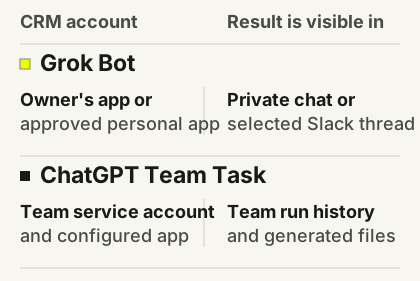
I would create a read-only CRM account limited to the approved records and fields. Then test one authorized record and one record outside the scope. Test in the scheduled job, the direct message and the pilot channel you intend to use. An agent that declines in a DM but reveals the same field in a channel fails the pilot.
One report for the pilot
Ask both products to prepare the same Monday brief:
- Which open deals changed stage or amount since the previous snapshot?
- Which deals have no next step or date?
- Which changes need a person to confirm, and who owns the decision?
Use the same snapshots, time zone, currency rules and deal definitions. Link to the CRM record for every material change. Reconcile totals against an export. Mark missing evidence and show the snapshot time. Start by delivering a private draft for review, with CRM updates and external messages outside the workflow.
For two weeks, check the scheduled run and replay a small set of known cases. Log material errors, inaccessible links, time to review, missed runs and usage charged. Add a synthetic record outside the bot’s allowed scope. If it appears in any response or file, stop the pilot. I would expand only after the brief matches the reference data and actually cuts review time against the manual baseline.
Where I would start
I would try Grok Bot first when reps need an ongoing conversation with the same shared bot in Slack or the app. I would try a ChatGPT Team Task first when the main job is a recurring brief with run history in an existing ChatGPT workspace. Either choice depends on whether the team can set the CRM connection and output audience at the right scope.
SpaceXSI has described its own sales bots and a Data Bot that uses shared metric definitions and query practices. The useful lesson is the maintenance work: someone owns the definitions and reviews proposed additions to the bot’s shared memory. Those case studies show how the vendor uses the product. They do not establish how much time a different team will save.
Grok Bot can select models from multiple providers and does not expose the model behind a given request. Grok Bot FAQ. Evaluate the cost per accepted brief, including the seat or usage cost and the time a person spends checking it. An API benchmark for Grok 4.7 cannot answer that question.
Demonstrations from the vendors
Grok’s launch video introduces the Bot as a product. The sales case study shows how the vendor set up Account Intel, Quote and Deal bots. Grok Bot launch video · Sales case study
OpenAI’s walkthrough shows how to choose Work, use plugins and review a result. The Team Tasks setup guide covers the scheduled workflow separately. ChatGPT Team Tasks setup
For benchmark scores and API costs, see the separate model comparison. Grok 4.7 vs GPT-6.1 Sol
Questions people ask
Does Grok Bot always use Grok 4.7?
No. Grok Bot chooses a model for each task and can use third-party models. It does not reveal or let the user select the model for a request.
Can both products prepare a recurring pipeline brief?
Yes, when the required routines or Team Tasks, app connections and permissions are available in the workspace. Verify the account that reads the CRM and the audience that receives the brief.