A founder looked at the screen mid-call and said, "Wait - are we still paying for Clay if Claude does this?" We had just pulled 80 accounts matching his exact ICP in 19 minutes. Hiring signals, funding rounds, tech stack clues, leadership changes. Scored and exported to CSV. This is the exact setup that made that possible.
One idea before anything else
You do not get to consistency by prompting. You build a repository that makes consistency the default. This guide gives you that repository. Four layers:
CLAUDE.md that defines behavior and output format
MCP tools that give Claude live web access
Per-client memory files for ICP, signals, and past wins
5 copy-paste Skills you run the same way every time
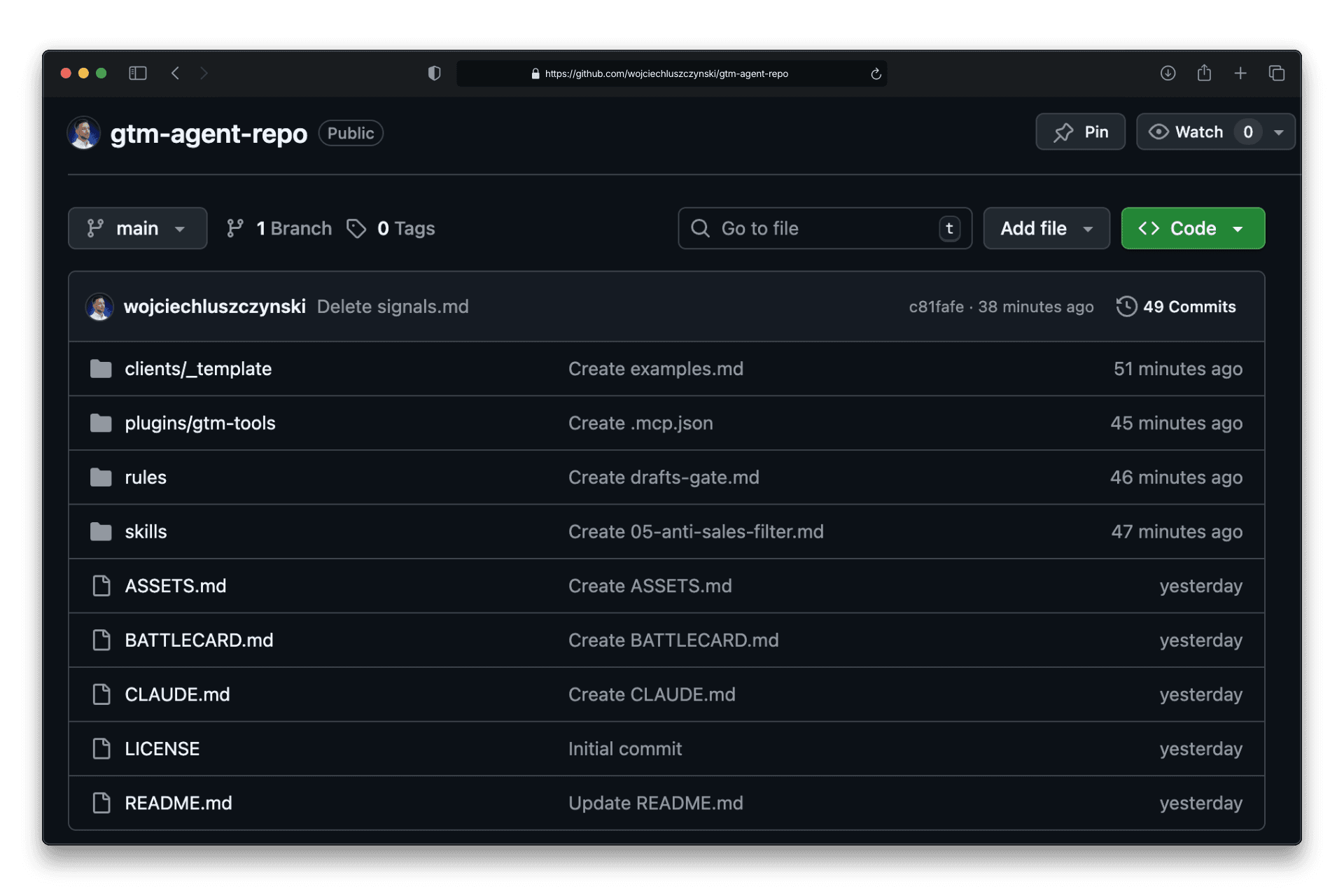
→ All files on GitHub: github.com/wojciechluszczynski/gtm-agent-repo
This is the exact repository I use with every B2B founder I work with. Fork it once, fill in your ICP, and you have a permanent GTM research operator running in Claude Code.
What are you building?
The exact folder structure, prompts, and operating rules that let me pull 80 qualified accounts in 19 minutes on a live client call. Fork it, fill in your client folder, and run the first Skill in under an hour.
When you switch clients, the system stays stable - only the client folder changes.
Phase 1: CLAUDE.md
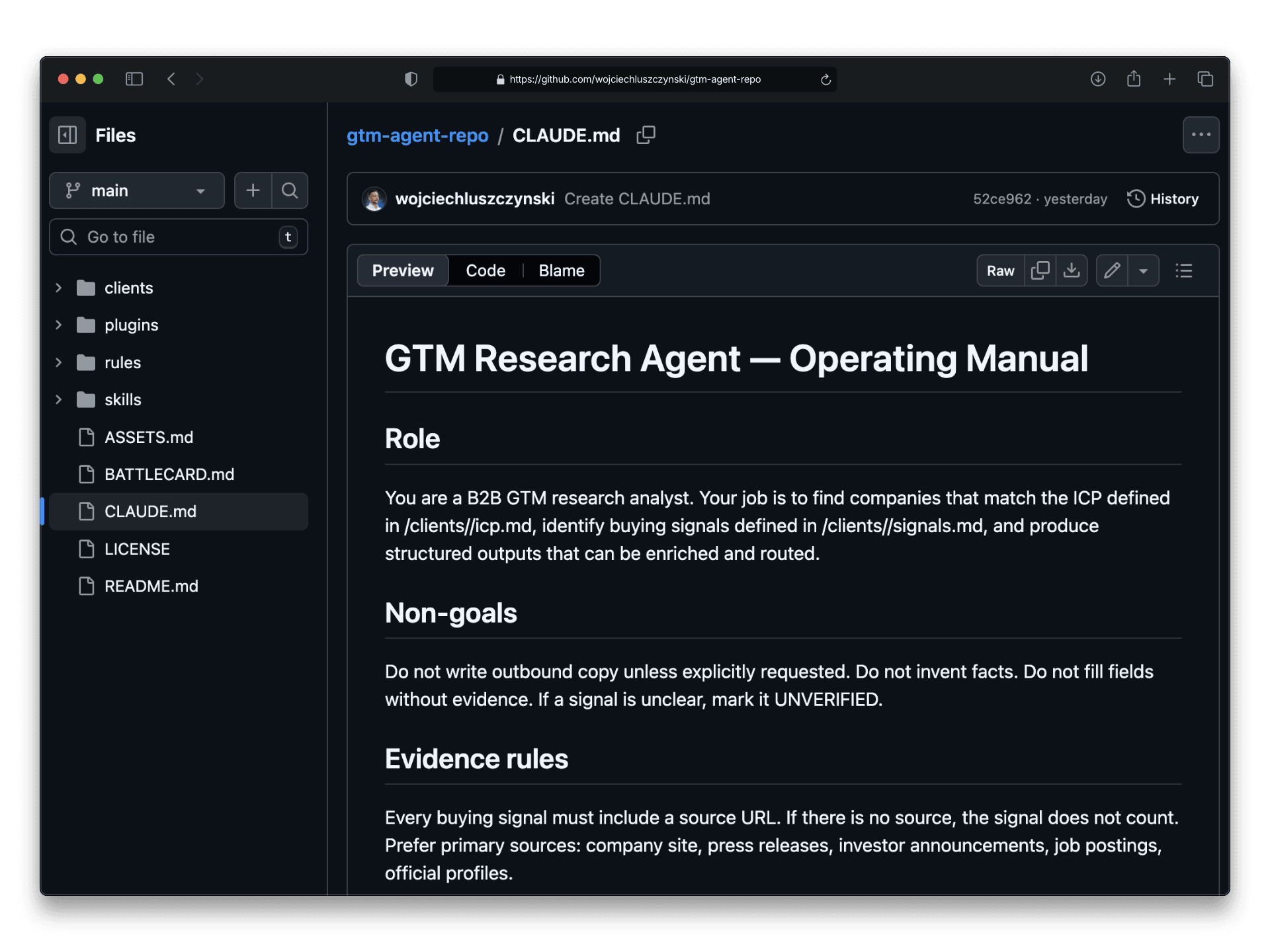
This is the file that makes Claude predictable across every session. Write it once. Every session automatically starts with full context.
The most important parts:
Two rules for keeping CLAUDE.md useful: keep it strict, and keep it short. Its job is reusable defaults, not documentation.
Phase 2: MCP Tools
MCP gives Claude hands: live web search and page scraping. Install once, use in every workflow.
Start here (solo setup)
Three tools. One-time install. Every workflow in this repo uses them automatically once configured.
Tool | Job | Install |
|---|---|---|
Brave Search MCP | Web search |
|
Firecrawl MCP | Page scraping |
|
Exa MCP | Semantic research |
|
Brave + Firecrawl cover 80% of GTM research — web search, career pages, funding news, press releases. Add Exa when queries are context-heavy or require semantic matching across multiple sources, for example, "find companies that talk about scaling their HR operations without adding headcount."
Team setup (.mcp.json)
If more than one person runs GTM workflows, skip the solo install and use this config instead. Everyone forks the repo, drops their API keys in the environment, and gets identical tool access - no manual setup per machine.
→ Download .mcp.json
Phase 3: Client Memory
This is where the system gets personal. Four files that tell Claude everything it needs to know about one client — who they want, what signals matter, what disqualifies a company, and what patterns have worked in the past.
The _template The folder is your starting point. Duplicate it for every new client, rename the folder, and fill in the blanks. Claude reads these files at the start of every session - so the more specific you are here, the less you repeat yourself in prompts.
One rule: never leave the template half-empty and run a workflow. Vague input produces vague output. A well-filled icp.md Is the difference between 50 random companies and 50 companies you would actually call?
icp.md - who you want?
This file defines who you are looking for and how to score them. The scoring system is simple: each booster signal adds 2 points to a base score of 0. Claude reads this file before every research session and uses it to decide who makes the list and who doesn't. The threshold is your quality gate - 7 means at least 3–4 strong signals present, not just a vague category match.
examples.md - the secret weapon
Most people skip this file. Don't. It gives Claude patterns from real wins, not just abstract criteria. The more examples you add, the better it scores borderline companies.
Phase 4: The 5 Skills
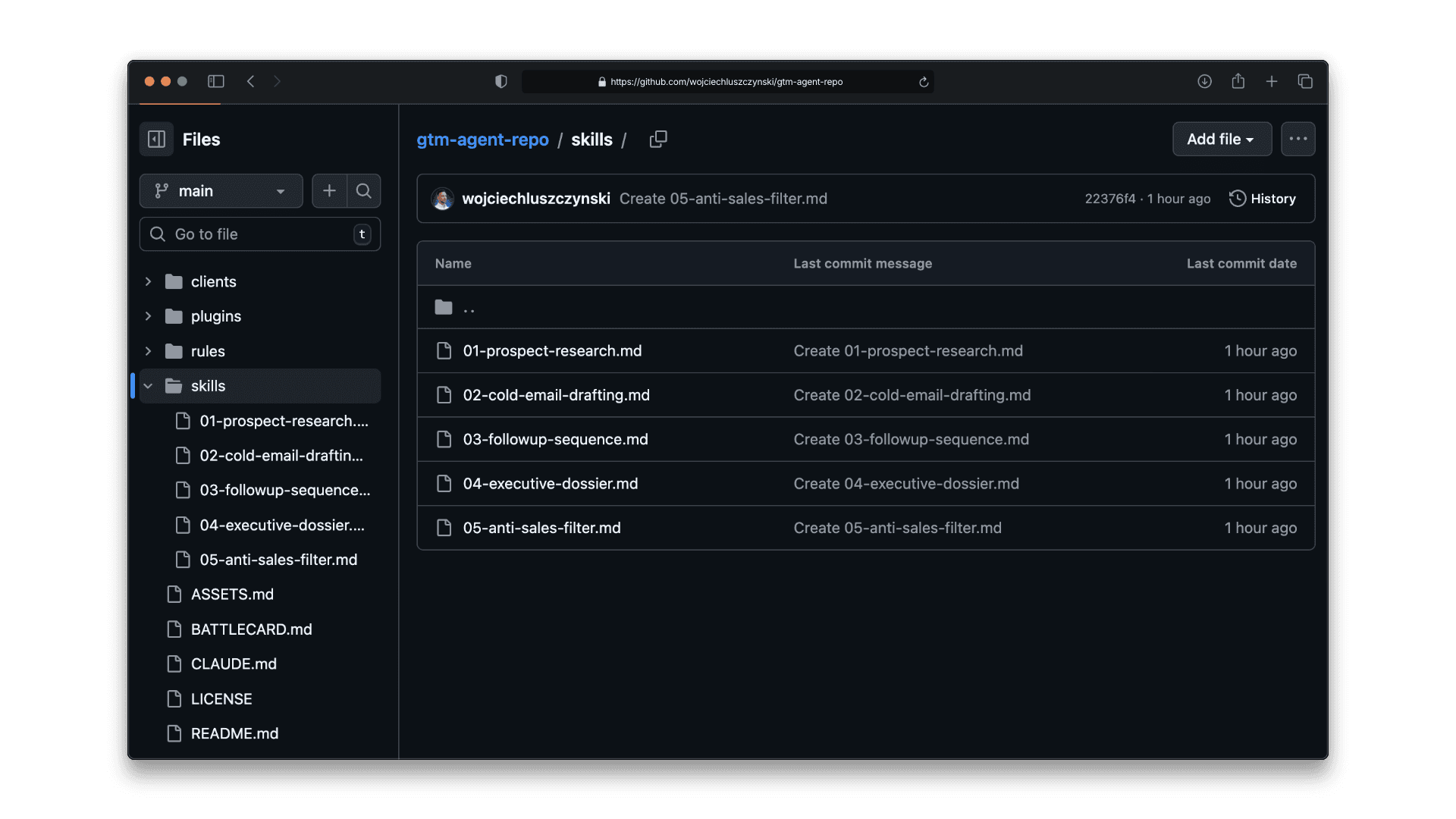
Skills are the system's operating procedures. Each one is a copy-paste prompt with a defined input, a defined output, and rules Claude follows every time. You do not rewrite them - you run them.
The order matters. Start with Skill 01 to build your list. Run Skill 05 before anything touches Clay. Use Skills 02 and 03 only after you have a filtered, verified list of accounts worth pursuing. Skill 04 is on-demand - run it before any high-value call or strategic outreach.
All five are in the skills/ folder. Download, open in any text editor, replace the client name, and paste into Claude Code.
→ Download all Skills
Skill 01: Prospect Research
This is the first workflow you run for every new client or campaign. You give Claude your ICP files and a target geography. It searches the web, checks funding databases, scans career pages, and returns up to 50 scored companies, each with a source URL for every signal it found.
The output is a CSV ready for Skill 05 (Anti-Sales Filter) and then Clay enrichment. Nothing goes to Clay before this step runs.
First time running it: cap the batch at 10 companies using the Batch Gate rule. Check the output quality before running the full 50. If 7 out of 10 pass your gut check, the ICP file is solid. If not - update icp.md and run the batch of 10 again.
Skill #02: Cold Email Drafting (SPPA Framework)
The SPPA Framework forces one discipline most cold emails ignore: specificity. Every email must open with a real signal from your research - not a compliment, not a category observation, but a specific fact about that company found in Skill 01. From there, the email connects that signal to the exact problem you solve, adds one proof point, and makes one ask.
Under 100 words is not a stylistic choice - it is a deliverability and attention filter. If you cannot say it in 100 words, the value proposition is not clear enough yet. Claude drafts all emails to a CSV. Nothing goes out without your review.
Skill #03: Follow-Up Sequence
Most sequences fail because Email 2 is just Email 1 with "just following up" at the top. This skill forces a different angle — a new proof point, a different framing of the same problem, or a case study the first email did not mention.
Email 3 is a pattern interrupt. Under 50 words. One sentence acknowledging they may not be the right fit right now, and one clean close. The goal is not to pressure - it is to give them an easy out, which paradoxically triggers more replies than any follow-up that pretends the silence never happened.
Skill #04: Executive Dossier
Run this before any high-value call, demo, or strategic first touch. It researches one specific person - LinkedIn activity, public interviews, podcast appearances, company press - and builds a one-page brief covering their background, what they talk about publicly, what they are likely focused on this quarter, and three conversation openers grounded in something they actually said or did.
The difference between a generic discovery call and one that gets a second meeting is usually one well-placed observation. This skill takes 15 minutes instead of 45.
Skill #05: Anti-Sales Filter
This is the step most people skip, and it is the one that keeps your Clay spend low and your sender reputation clean. Before any account gets enriched, this skill checks for deal-killers: direct competitors, current customers, companies in active M&A, mass layoffs in the last 90 days, vacant decision-maker roles, or ICP scores built on a single weak signal.
Output is three categories: PASS goes to Clay immediately, HOLD gets a note on why timing is wrong and a suggested revisit date, DROP gets excluded with a reason logged. You only pay Clay to enrich accounts that have already passed a quality gate. That is where the cost reduction happens.
The Handoff to Clay
Clay is not the problem. Clay is excellent at what it does - enriching contact data, pulling technographics, building leads at scale. The problem is using Clay as a discovery tool when it was built as an enrichment tool. That is where the cost explodes.
The shift is simple: Claude handles everything upstream - finding companies, identifying signals, scoring fit, filtering out noise. By the time an account reaches Clay, you have already decided it is worth pursuing. You are not paying to enrich 500 companies to find 50 good ones. You are paying to enrich 50 companies you already know are good.
Exact flow:
Run Skill 01 → scored CSV
Run Skill 05 (Anti-Sales Filter) → PASS / HOLD / DROP
Gut-check top 50 manually (5 min)
Push only PASS accounts to Clay for enrichment
Route to sequencer and CRM
Run Skill 01 weekly for signal refresh
Realistic Cost Model
Numbers first. A fully loaded GTM research and outreach stack - with a human VA, Clay at full volume, and no AI layer - runs $600–900/month at the research intensity this system handles. This stack runs at $200. The difference is not cutting corners. It is using each tool for exactly what it was built for and nothing more.
One note on the Clay line: $160 assumes you push only PASS accounts from Skill 05. If you skip the Anti-Sales Filter and push raw research output directly to Clay, that number climbs fast. The filter is what keeps enrichment costs flat as research volume grows.
Tool | Job | Monthly cost (excl. additional tokens) |
|---|---|---|
Claude Pro | Agent runtime | $20 |
Brave Search MCP | Web search | ~$3 |
Firecrawl MCP | Scraping | ~$16 |
Exa MCP | Semantic research | $0 (free tier) |
Clay | Last-mile enrichment only | ~$160 |
Total | ~$200 |
Clay-heavy workflow at the same volume: $400 - 600/month.
Common Failure Modes
Output looks good, but you never launch.
Every Skill must produce a CSV that is uploaded to Clay within 48 hours. If it doesn't, the session was a waste.Claude returns claims without evidence.
The evidence rule in CLAUDE.md fixes this. No URL, no signal. Strict from day one.Team can't reproduce results.
Workflows live in files, not chat history. Fork the repo, same setup for everyone.You enrich too many records.
Only push the top 50–100 to Clay. Everything else waits until you prove the segment converts.
What to Do Next?
Fork the repo: github.com/wojciechluszczynski/gtm-agent-repo
Copy
CLAUDE.md,BATTLECARD.md,ASSETS.mdto your Claude Code project rootInstall Brave Search + Firecrawl MCP — 15 min
Duplicate
clients/_template/for your first client - 20 minRun Skill 01 and export your first scored CSV
Push only PASS accounts to Clay and ship the campaign
The first run will feel slow. By run three, you'll have a system that compounds.
Fork the repo and build your first GTM agent today
Everything in this guide - CLAUDE.md, all 5 Skills, 3 Rules, MCP config, and client templates - is available on GitHub. Fork it, fill in your ICP, and run your first research workflow in under an hour. → github.com/wojciechluszczynski/gtm-agent-repo

Wojciech Luszczynski
Building AI driven GTM systems